


Why not create your own chatbot, your own AI, so to speak, focused on a specific theme?
Let’s take a look at the 1cour1bot tool, which will help guide students through the topic of Excel spreadsheets, in conjunction with your lessons and exercises.
Once on the 1cour1bot website interface, there are three options for creating your own chatbot:
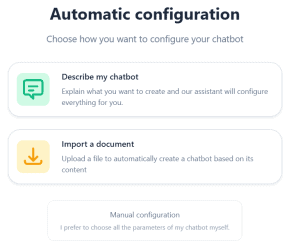
- Describe your chatbot: the AI will search for information itself based on the chosen theme. In this case, you do not control the content of the tool, as with traditional AI. This is the fastest option.
- Importing a document: this is where the application comes into its own, as you will be ‘feeding’ the chatbot with your materials, and future exchanges between the AI and your students will be based solely on this content.
- Configure your chatbot manually (in more detail). You can choose the different modules offered to students. Please note that these modules can be created at a later stage if we have chosen one of the two previous options:
Let’s test the automatic configuration
We are asked the following questions:
- Chatbot subject: Excel
- Learners’ educational level: adult audience with no specific educational level
- Chatbot role (course tutor, methodology assistant): course tutor
- Specific learning objectives: You must master the basic tools for creating tables, be familiar with the Font, Alignment, Number groups, simple conditional formatting and basic functions, and master printing (page layout, page breaks).
- Structure of the conversation: Welcome -> Presentation of concepts -> Practical examples -> Guided exercises -> Review
Support: no specific support - Choice of chatbot greeting: “Hello and welcome! I am your personal tutor for Excel. Together, we will discover and master the basics of the software. Ready to begin?”
It takes a few moments to generate the chatbot that will explain and answer the learner’s questions. One slight drawback, however, is that the chatbot can explain but does not offer any illustrations.
It should be noted that we can add our own materials even after it has been created.
To enrich it, we have two main tools:
- Add our own sources (to maintain control over concepts and examples),
- Use specific modules.
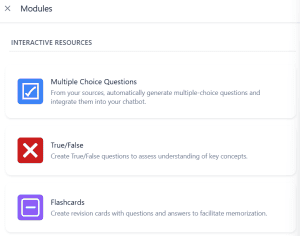
QCM unit
Based on your resources, AI generates a multiple-choice quiz on the topic of your choice:
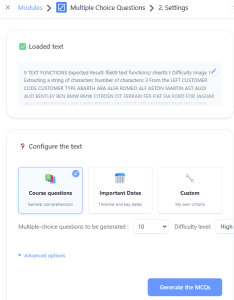
We can set the type of question, the difficulty, the number of questions, etc. Feedback is also created but is not mandatory.
Let’s test the question: What is the main purpose of conditional formatting in Excel?
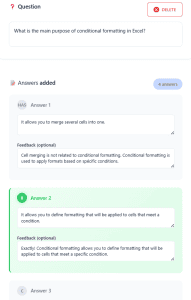
Please note that it is possible to add an answer.
It is a pity that the results of this multiple-choice questionnaire are not communicated to the teacher.
True/False unit
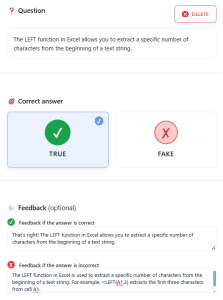
A variation on the multiple-choice quiz, with the same concept: being able to choose the source for generating questions, creating your own questions and, why not, adding feedback:
Flashcards unit
As with the multiple-choice questions, the AI asks us to specify the source from which to generate this revision sheet, and the topic (general revision, definitions or formulas).
The flashcards then take the form of a question asked to the student, with the answer revealed afterwards. The student is asked to indicate whether or not they had the correct answer.
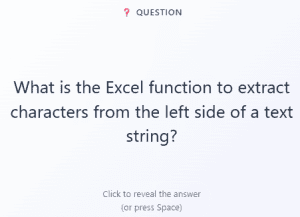
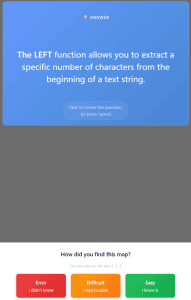
At the end of the course, the result is shown to the student:
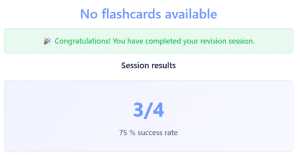
This result is also not visible to the teacher. Only the chat allows for communication.
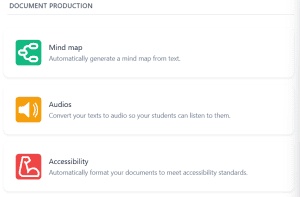
Mind map unit
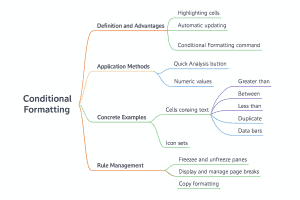
This tool enables the automatic generation of mind maps. Below is a mind map created on the topic of conditional formatting:
Audio unit
This tool allows you to convert your texts into audio files so that students can listen to them. Please note that the text cannot be too long (maximum 4,096 characters).
Accessibility unit
Tool that requires you to rework your material. This process is not completely automatic; you will need to add a description to each image. The layout of your original material must not be too complex, otherwise the modifications made to make your document more accessible will not be effective.
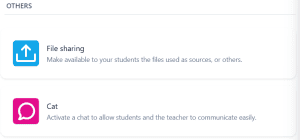
File Sharing unit
To upload materials that learners can view and download.
Chat unit
So that your learners can interact with you.
From the student’s perspective
Once logged in, learners discover the opening sentence suggested by the teacher. They can either chat directly with the chatbot or, if they lack inspiration, receive suggestions.
The various modules prepared by the teacher are, of course, available.
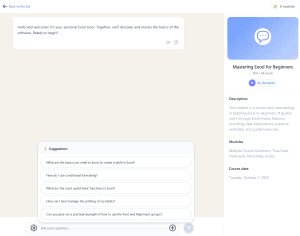
This AI tool therefore allows students to work individually and independently, with the option of communicating with the teacher (via chat).